
You should upgrade or use an alternative browser.
Translations Help Needed!
- Thread starter Zankza
- Start date

- Joined
- May 25, 2016
- Messages
- 4,302
- Reaction score
- 2,102
- Points
- 139
The very first thing you should do is try by doing a 'Version Check' this will ensure your launcher and client are the latest available offering, as older ones may not function properly or do not have capabilities to play.
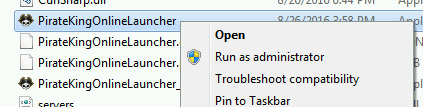
1. Locate PirateKingOnlineLauncher.exe and execute as Administrator. Right-Click on PirateKingOnlineLauncher.exe and click "Run as Administrator". PirateKingOnlineLauncher.exe is located in main client folder, or you may have a short cut to PirateKingOnlineLauncher.exe on desktop.
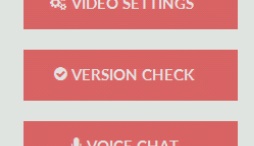
2. After the client launcher is launched, Begin Version Check by clicking on button at top left corner, Where a drop menu will appear with choice of "Version Check" in the top of list.
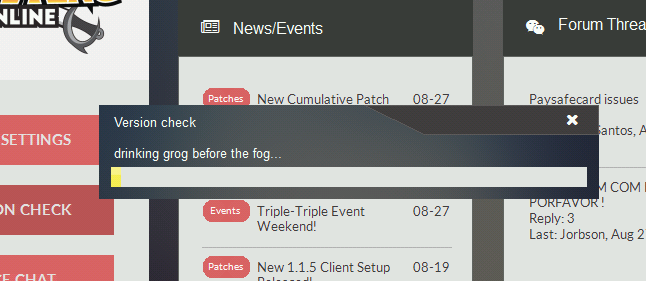
3. The launcher will automatically quickly scan your client files and begin to download any missing or malformed client files.
At this point, If you are still unable to play, It means that you have a service or program that is actively blocking the connection such as firewall or anti-virus.
1. Unfortunately because there is too many anti-virus and firewall solutions there is no easy way of turning them off, You will need to contact your antivirus/firewall company to ask them how to remove/stop.
2. In very rare condition, You may have a ISP that does internet filtering which means you most likely cannot play because ISP do not remove or allow you to circumvent this filtering.
Your post indicates you are having intermediate problems with launching client. Our launcher is heavily customized, It is very diligent as it performs many critical functions that invokes proper playing condition.
<br><br>
The very first thing you should do is try by doing a <b>'Version Check'</b> this will ensure your launcher and client are the latest available offering, as older ones may not function properly or do not have capabilities to play.
<br><br>
1. Locate PirateKingOnlineLauncher.exe and execute as Administrator. Right-Click on PirateKingOnlineLauncher.exe and click "Run as Administrator". PirateKingOnlineLauncher.exe is located in main client folder, or you may have a short cut to PirateKingOnlineLauncher.exe on desktop.
<br><img src='https://devxf2.piratekings.online/img/bbcode/kop_admin.png'>
<br>
2. After the client launcher is launched, Begin Version Check by clicking on button at top left corner, Where a drop menu will appear with choice of "Version Check" in the top of list.
<br><img src='https://devxf2.piratekings.online/img/bbcode/version_check.png'>
<br>
3. The launcher will automatically quickly scan your client files and begin to download any missing or malformed client files.
<br><img src='https://devxf2.piratekings.online/img/bbcode/version_checking.png'>
<br>
<br>At this point, If you are still unable to play, It means that you have a service or program that is actively blocking the connection such as firewall or anti-virus.
<br><br>
1. Unfortunately because there is too many anti-virus and firewall solutions there is no easy way of turning them off, You will need to contact your antivirus/firewall company to ask them how to remove/stop.
<br><br>
2. In very rare condition, You may have a ISP that does internet filtering which means you most likely cannot play because ISP do not remove or allow you to circumvent this filtering.- Joined
- May 25, 2016
- Messages
- 4,302
- Reaction score
- 2,102
- Points
- 139
In order for everyone to receive speedy attention to their questions, requests and any other concerns you must create your own topic in our support centre. You may create topic by visiting <a href='https://devxf2.piratekings.online/forum/forums/questions-support.14/create-thread'>Support Centre</a>. Please note that you may not Private Message Administrators or GM for support, as you would be directed to make a topic in support centre.- Joined
- May 25, 2016
- Messages
- 4,302
- Reaction score
- 2,102
- Points
- 139
In order for everyone to receive speedy attention to their questions, requests and any other concerns you must create your own topic in our support centre. You may create topic by visiting <a href='https://devxf2.piratekings.online/forum/forums/questions-support.14/create-thread'>Support Centre</a>- Joined
- May 25, 2016
- Messages
- 4,302
- Reaction score
- 2,102
- Points
- 139
Your post indicates you are reporting a bug however it doesn't contain sufficient details or evidences to allow development team to further purse your case. Your bug report must follow our sticked bug report guide, Please take a moment to read and afterwards you may return and edit your post to comply the bug report compliance.- Joined
- May 25, 2016
- Messages
- 4,302
- Reaction score
- 2,102
- Points
- 139
WARNING: The information is provided "AS IS" and is solely used to share technical knowledge with players but provides no warrant or assurances. The information shared are NOT code of conduct, agreement, nor implied. We reserve the right to decide the final interpretations and changes to the information without expressing or expressing of notification of changes.
LuisaRLZ
Admiral
- Joined
- Jul 16, 2016
- Messages
- 641
- Reaction score
- 759
- Points
- 124
- Age
- 31
- Location
- Mexico
- Website
- www.youtube.com
LuisaRLZ
Admiral
- Joined
- Jul 16, 2016
- Messages
- 641
- Reaction score
- 759
- Points
- 124
- Age
- 31
- Location
- Mexico
- Website
- www.youtube.com
<br><br>
La primera cosa que debes de intentar hacer es un <b>'Version Check'</b>, esto asegurara que tu lanzador y tu cliente tengan las actualizaciones mas nuevas - un cliente viejo podria no funcionar correctamente o simplemente no funcionar del todo.
<br><br>
1. Busca el archivo PirateKingOnlineLauncher.exe y ejecutalo como administrador. Dale click derecho a PirateKingOnlineLauncher.exe y luego procede a darle click a "Ejecutar como Administrador". PirateKingOnlineLauncher.exe se localiza en la carpeta principal del cliente, o puedes simplemente usar el acceso directo de PirateKingOnlineLauncher.exe que esta en el escritorio.
<br><img src='https://devxf2.piratekings.online/img/bbcode/kop_admin.png'>
<br>
2.Despues de que lances el lanzador del cliente, comienza el Version Check dandole click al boton que esta en la esquina de arriba de la izquierda de la ventana, donde saldra un menu que tendra la opcion de "Version Check" en la parte de arriba de la lista.
<br><img src='https://devxf2.piratekings.online/img/bbcode/version_check.png'>
<br>
3. El lanzador automaticamente hara un scan rapido de los archivos de tu cliente y comenzara a descargar cualquier archivo faltante o corrupto de tu cliente.
<br><img src='https://devxf2.piratekings.online/img/bbcode/version_checking.png'>
<br>
<br>Si en este punto aun no puedes jugar, significa que tienes un servicio o programa que esta activamente bloqueando la conexion con el servidor, tales como firewall o algun antivirus.
<br><br>
1. Desafortunadamente, a pesar de que hay demasiadas soluciones para el problema los antivirus y firewalls, no hay ningun metodo exactamente facil de apagarlos. Tendras que contactar la compañia de donde conseguiste tu firewall/antivirus para preguntarles como removerlos o detenerlos.
<br><br>
2. Bajo condiciones muy raras, podria ser tambien que tu ISP haya puesto algun filtro de internet lo cual significa que muy posiblemente no puedas jugar porque el ISP probablemente no te dejara remover o burlar estos filtros.
Tu post indica que estas teniendo problemas intermedios con el lanzamiento del cliente. Nuestro lanzador es uno muy personalizado, por lo cual es muy diligente puesto que realiza muchas funciones criticas las cuales recurren a tener una condicion de jugabilidad apropiada

<br><br>
La primera cosa que debes de intentar hacer es un <b>'Version Check'</b>, esto asegurara que tu lanzador y tu cliente tengan las actualizaciones mas nuevas - un cliente viejo podria no funcionar correctamente o simplemente no funcionar del todo.
<br><br>
1. Busca el archivo PirateKingOnlineLauncher.exe y ejecutalo como administrador. Dale click derecho a PirateKingOnlineLauncher.exe y luego procede a darle click a "Ejecutar como Administrador". PirateKingOnlineLauncher.exe se localiza en la carpeta principal del cliente, o puedes simplemente usar el acceso directo de PirateKingOnlineLauncher.exe que esta en el escritorio.
<br><img src='https://devxf2.piratekings.online/img/bbcode/kop_admin.png'>
<br>
2.Despues de que lances el lanzador del cliente, comienza el Version Check dandole click al boton que esta en la esquina de arriba de la izquierda de la ventana, donde saldra un menu que tendra la opcion de "Version Check" en la parte de arriba de la lista.
<br><img src='https://devxf2.piratekings.online/img/bbcode/version_check.png'>
<br>
3. El lanzador automaticamente hara un scan rapido de los archivos de tu cliente y comenzara a descargar cualquier archivo faltante o corrupto de tu cliente.
<br><img src='https://devxf2.piratekings.online/img/bbcode/version_checking.png'>
<br>
<br>Si en este punto aun no puedes jugar, significa que tienes un servicio o programa que esta activamente bloqueando la conexion con el servidor, tales como firewall o algun antivirus.
<br><br>
1. Desafortunadamente, a pesar de que hay demasiadas soluciones para el problema los antivirus y firewalls, no hay ningun metodo exactamente facil de apagarlos. Tendras que contactar la compañia de donde conseguiste tu firewall/antivirus para preguntarles como removerlos o detenerlos.
<br><br>
2. Bajo condiciones muy raras, podria ser tambien que tu ISP haya puesto algun filtro de internet lo cual significa que muy posiblemente no puedas jugar porque el ISP probablemente no te dejara remover o burlar estos filtros.LuisaRLZ
Admiral
- Joined
- Jul 16, 2016
- Messages
- 641
- Reaction score
- 759
- Points
- 124
- Age
- 31
- Location
- Mexico
- Website
- www.youtube.com
Para que todos reciban atencion rapida a sus preguntas, solicitudes y otros asuntos, debes de crear tu propio topic en nuestro support centre. Puedes crear tu topic visitando <a href='https://devxf2.piratekings.online/forum/forums/questions-support.14/create-thread'>Support Centre</a>. Porfavor toma en cuenta que no puedes mandarle mensajes privados a los administradores o GM para soporte, ya que igual te mandaran a hacer el topic en el support centre.LuisaRLZ
Admiral
- Joined
- Jul 16, 2016
- Messages
- 641
- Reaction score
- 759
- Points
- 124
- Age
- 31
- Location
- Mexico
- Website
- www.youtube.com
Para que todos reciban atencion rapida a sus preguntas, solicitudes y otros asuntos, debes de crear tu propio topic en nuestro support centre. Puedes crear tu topic visitando <a href='https://devxf2.piratekings.online/forum/forums/questions-support.14/create-thread'>Support Centre</a>LuisaRLZ
Admiral
- Joined
- Jul 16, 2016
- Messages
- 641
- Reaction score
- 759
- Points
- 124
- Age
- 31
- Location
- Mexico
- Website
- www.youtube.com
Tu post indica que estas reportando un bug, aun asi, este no contiene los suficientes detalles o evidencias para permitir que el equipo de desarrolladores investigue tu caso. Tu reporte de bug debe seguir las indicaciones descritas en nuestra guia de como reportar bugs, por favor tomate un momento para leerla y despues puedes ya regresar a editar tu post para complementar tu reporte de bug.LuisaRLZ
Admiral
- Joined
- Jul 16, 2016
- Messages
- 641
- Reaction score
- 759
- Points
- 124
- Age
- 31
- Location
- Mexico
- Website
- www.youtube.com
ADVERTENCIA: La informacion es provista "COMO TAL" y es solamente utilizada para compartir conocimiento tecnico con los jugadores pero esta no te garantiza nada. La informacion compartida NO es un codigo de conducta, acuerdo ni esta implicada. Nos reservamos el derecho de decidir las interpretaciones finales y los cambios a la informacion sin expresarlo o expresar notificaciones de cambios.Similar threads


-
About Us
Pirate King Online (also known as Tales of Pirates) is fully 3D designed multiplayer online game based on 5000 years of background history with Pirates as its central theme. It is comical in nature and has humorous looking characters and creatures. The games scenery is splashed with bright and beautiful colors everywhere. The exaggerated movements and actions of characters as well as objects, topped with an atmosphere that is very relaxed, makes the game consistently entertaining and always interesting and fresh for newbies and veteran players alike. Platform:
Release Date: July, 2016
Game Type: Fantasy MMORPG
Features: Very customizable characters, PK focused, Guilds system, Advanced commerce, Vanilla, Regular events -
Game
-
Community