WildLego
New Member
- Joined
- Jul 18, 2016
- Messages
- 10
- Reaction score
- 1
- Points
- 3
- Age
- 29
Hello,
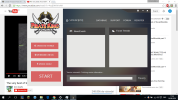
I have been having issues with my client not starting. When I double click on the PKO icon nothing happens. I check the background processes, there it is. I try opening it again, first without ending the proccess - Can't launch more than one copy of launcher. I restart my computer, issue persisted. I reinstall PKO - the first time I had the issue it worked, the 2nd time, after the reinstall, I still had the issue. I wait a few hours - it works. The next day - doesn't work again. I wait a few minutes, the updater starts but it does not update. Nothing appears in the chat or in the news fields (see attachment) and I can't start.
I have windows 10, Intel Celeron 2.16 GHz, 4GB RAM. The game used to work for a few weeks until yesterday. I have not made any changes to the computer, I have not installed any new apps since then. I know my Laptop is bad but it's good enough for pko.
Thank you,
WildLegoV
I have been having issues with my client not starting. When I double click on the PKO icon nothing happens. I check the background processes, there it is. I try opening it again, first without ending the proccess - Can't launch more than one copy of launcher. I restart my computer, issue persisted. I reinstall PKO - the first time I had the issue it worked, the 2nd time, after the reinstall, I still had the issue. I wait a few hours - it works. The next day - doesn't work again. I wait a few minutes, the updater starts but it does not update. Nothing appears in the chat or in the news fields (see attachment) and I can't start.
I have windows 10, Intel Celeron 2.16 GHz, 4GB RAM. The game used to work for a few weeks until yesterday. I have not made any changes to the computer, I have not installed any new apps since then. I know my Laptop is bad but it's good enough for pko.
Thank you,
WildLegoV