What's new

Connection Failed

Irfan

Squid Slayer
Joined
Nov 7, 2016
Messages
50
Reaction score
13
Points
8
Age
30
i can connect with the servers............ connection fail connection failed........ @Zankza
 
Your post indicates you are having intermediate problems with launching client. Our launcher is heavily customized, It is very diligent as it performs many critical functions that invokes proper playing condition.

The very first thing you should do is try by doing a 'Version Check' this will ensure your launcher and client are the latest available offering, as older ones may not function properly or do not have capabilities to play.

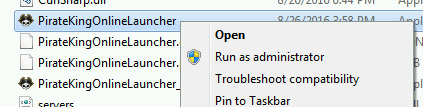
1. Locate PirateKingOnlineLauncher.exe and execute as Administrator. Right-Click on PirateKingOnlineLauncher.exe and click "Run as Administrator". PirateKingOnlineLauncher.exe is located in main client folder, or you may have a short cut to PirateKingOnlineLauncher.exe on desktop.
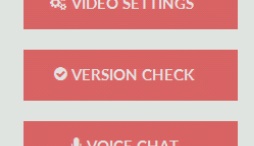
2. After the client launcher is launched, Begin Version Check by clicking on button at top left corner, Where a drop menu will appear with choice of "Version Check" in the top of list.
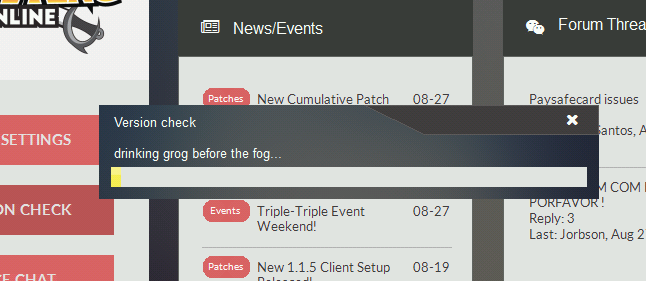
3. The launcher will automatically quickly scan your client files and begin to download any missing or malformed client files.

At this point, If you are still unable to play, It means that you have a service or program that is actively blocking the connection such as firewall or anti-virus.

1. Unfortunately because there is too many anti-virus and firewall solutions there is no easy way of turning them off, You will need to contact your antivirus/firewall company to ask them how to remove/stop.

2. In very rare condition, You may have a ISP that does internet filtering which means you most likely cannot play because ISP do not remove or allow you to circumvent this filtering.

 
2. In very rare condition, You may have a ISP that does internet filtering which means you most likely cannot play because ISP do not remove or allow you to circumvent this filtering.
 
go to the PKO folder and open the highlighted file.
ping1.png


go to the search bar and type "cmd" without the quotation marks ofc, and open the application
ping_2.png


then type the "ping<space >I.P address of the selected server" and hit enter *taken from that XML Document earlier
*
ping3.png


and it will look like this
ping4.png


*ya should take note about Packets Lost
  • 0, means there's no interference and a smooth connection to the server is guaranteed.
  • 1 ( 25% loss ), ya can possibly experience delay/lag in-game sometimes
  • 2 ( 50% loss ), the delay/lag is often and it might force ya to slam yer keyboard/mouse
  • 3 ( 75% loss ), i advise not to play
  • 4 ( 100% loss) , no connection can be established, 0 bit. ( this time, blame yer ISP knowing that the PKO server itself is functional )

*and one more thing, ya gotta select a server with lesser ping rate. check out this thread on how to do it

https://devxf2.piratekings.online/forum/threads/reduce-the-lag-in-seconds.3569/#post-23999

i mostly play with a ping of 280ms no matter what server i choose, and that's a disadvantage.
but no worries, the game's still playable.
 
Last edited:
go to the PKO folder and open the highlighted file.
ping1.png


go to the search bar and type "cmd" without the quotation marks ofc, and open the application
ping_2.png


then type the "ping<space >I.P address of the selected server" and hit enter *taken from that XML Document earlier
*
ping3.png


and it will look like this
ping4.png


*ya should take note about Packets Lost
  • 0, means there's no interference and a smooth connection to the server is guaranteed.
  • 1 ( 25% loss ), ya can possibly experience delay/lag in-game sometimes
  • 2 ( 50% loss ), the delay/lag is often and it might force ya to slam yer keyboard/mouse
  • 3 ( 75% loss ), i advise not to play
  • 4 ( 100% loss) , no connection can be established, 0 bit. ( this time, blame yer ISP knowing that the PKO server itself is functional )

*and one more thing, ya gotta select a server with lesser ping rate. check out this thread on how to do it

https://devxf2.piratekings.online/forum/threads/reduce-the-lag-in-seconds.3569/#post-23999

i mostly play with a ping of 280ms no matter what server i choose, and that's a disadvantage.
but no worries, the game's still playable.
i solved my problem... TY MEN HAHA
 
Top