
You should upgrade or use an alternative browser.
can't start game.
- Thread starter justbase
- Start date
It says "Game is ready to start" but when i click Start an error shows SDL.dll MindPower3D_D8R.dll CaLua.dll SDL_mixer.dll are missingRun version check via your launcher.
Uninstall your anti-virus beforehand too.

LuisaRLZ
Admiral
- Joined
- Jul 16, 2016
- Messages
- 641
- Reaction score
- 759
- Points
- 124
- Age
- 31
- Location
- Mexico
- Website
- www.youtube.com
what for is this luisa?
How does it work?

- Joined
- May 25, 2016
- Messages
- 4,302
- Reaction score
- 2,102
- Points
- 139
The very first thing you should do is try by doing a 'Version Check' this will ensure your launcher and client are the latest available offering, as older ones may not function properly or do not have capabilities to play.
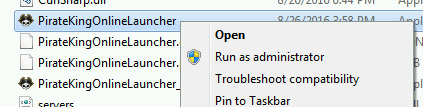
1. Locate PirateKingOnlineLauncher.exe and execute as Administrator. Right-Click on PirateKingOnlineLauncher.exe and click "Run as Administrator". PirateKingOnlineLauncher.exe is located in main client folder, or you may have a short cut to PirateKingOnlineLauncher.exe on desktop.
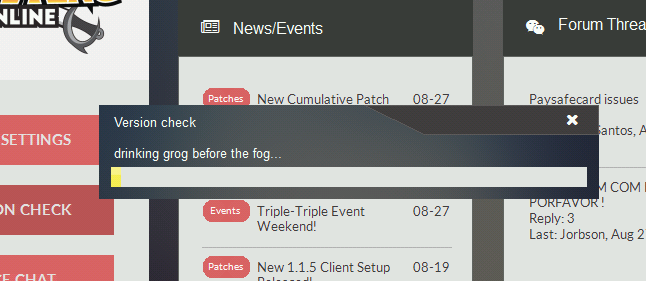
2. After the client launcher is launched, Begin Version Check by clicking on button at top left corner, Where a drop menu will appear with choice of "Version Check" in the top of list.

3. The launcher will automatically quickly scan your client files and begin to download any missing or malformed client files.
At this point, If you are still unable to play, It means that you have a service or program that is actively blocking the connection such as firewall or anti-virus.
1. Unfortunately because there is too many anti-virus and firewall solutions there is no easy way of turning them off, You will need to contact your antivirus/firewall company to ask them how to remove/stop.
2. In very rare condition, You may have a ISP that does internet filtering which means you most likely cannot play because ISP do not remove or allow you to circumvent this filtering.
LuisaRLZ
Admiral
- Joined
- Jul 16, 2016
- Messages
- 641
- Reaction score
- 759
- Points
- 124
- Age
- 31
- Location
- Mexico
- Website
- www.youtube.com
How does it work?
its to update the files needed for your pc to run games correctly. sometimes very old pcs or new pcs that havent been updated might have a very old version of directX or not have it at all, so updating this usually fixes the .dll problems.

- Joined
- May 31, 2016
- Messages
- 2,313
- Reaction score
- 979
- Points
- 138
This can happen ONLY if Files are missing.It says "Game is ready to start" but when i click Start an error shows SDL.dll MindPower3D_D8R.dll CaLua.dll SDL_mixer.dll are missing
Please do what @Zankza suggested.
Similar threads


-
About Us
Pirate King Online (also known as Tales of Pirates) is fully 3D designed multiplayer online game based on 5000 years of background history with Pirates as its central theme. It is comical in nature and has humorous looking characters and creatures. The games scenery is splashed with bright and beautiful colors everywhere. The exaggerated movements and actions of characters as well as objects, topped with an atmosphere that is very relaxed, makes the game consistently entertaining and always interesting and fresh for newbies and veteran players alike. Platform:
Release Date: July, 2016
Game Type: Fantasy MMORPG
Features: Very customizable characters, PK focused, Guilds system, Advanced commerce, Vanilla, Regular events -
Game
-
Community