What's new

Stucked at launcher

gpalomeno

New Member
Joined
Jun 16, 2017
Messages
11
Reaction score
0
Points
1
Age
26
I am stucked when I open the launcher. Stucked at "garner.obj" or "pirate king online launcher.exe" update files. There is also a message saying

"Pirate king online has encountered an internal problem! Please send us your technical log containing support information. You need to visit our forum support centre and crest topic with log details. Log location: C:\program files(x86)\Pirate King Online\pkolauncherlog.txt"

This message appears either at garner.obj update file or piratekinglauncher.exe update file at launcher. I already reinstalled the game but nah..
 
Do screenshot the contents of the pkolauncherlog.txt, upload the screenshot to https://imgur.com and we'll see what went wrong.
 
[22/06/2017 5:29:45 PM] :: Void Fill() threw an unhandled exception: Unexpected EOF => at ICSharpCode.SharpZipLib.Zip.Compression.Streams.InflaterInputStream.Fill()
at ICSharpCode.SharpZipLib.Zip.Compression.Streams.InflaterInputStream.Read(Byte[] buffer, Int32 offset, Int32 count)
at ICSharpCode.SharpZipLib.GZip.GZipInputStream.Read(Byte[] buffer, Int32 offset, Int32 count)
at PirateKingOnlineLauncher.Helpers.PackerHelper.CopyStream(Stream input, Stream output)
at PirateKingOnlineLauncher.Helpers.PackerHelper.Unpack(String Source, String Destination)
at PirateKingOnlineLauncher.Workers.UpdaterWorker.DoUpdate(VerInfo UpdateList)
[22/06/2017 6:06:00 PM] :: Void Fill() threw an unhandled exception: Unexpected EOF => at ICSharpCode.SharpZipLib.Zip.Compression.Streams.InflaterInputStream.Fill()
at ICSharpCode.SharpZipLib.Zip.Compression.Streams.InflaterInputStream.Read(Byte[] buffer, Int32 offset, Int32 count)
at ICSharpCode.SharpZipLib.GZip.GZipInputStream.Read(Byte[] buffer, Int32 offset, Int32 count)
at PirateKingOnlineLauncher.Helpers.PackerHelper.CopyStream(Stream input, Stream output)
at PirateKingOnlineLauncher.Helpers.PackerHelper.Unpack(String Source, String Destination)
at PirateKingOnlineLauncher.Workers.UpdaterWorker.DoUpdate(VerInfo UpdateList)
[22/06/2017 6:20:19 PM] :: Void Fill() threw an unhandled exception: Unexpected EOF => at ICSharpCode.SharpZipLib.Zip.Compression.Streams.InflaterInputStream.Fill()
at ICSharpCode.SharpZipLib.Zip.Compression.Streams.InflaterInputStream.Read(Byte[] buffer, Int32 offset, Int32 count)
at ICSharpCode.SharpZipLib.GZip.GZipInputStream.Read(Byte[] buffer, Int32 offset, Int32 count)
at PirateKingOnlineLauncher.Helpers.PackerHelper.CopyStream(Stream input, Stream output)
at PirateKingOnlineLauncher.Helpers.PackerHelper.Unpack(String Source, String Destination)
at PirateKingOnlineLauncher.Workers.UpdaterWorker.DoUpdate(VerInfo UpdateList)
 
My antivirus is already expired and windows defender is turned off
 
Something is messing around with your downloads, a anti-virus or possibly, your internet-service is not allowing you to download whole file as it got cut off abruptly.
 
Unexpected EOF This means the payload was abruptly ended, when it was expected for more.
 
My antivirus is expired so a think it wouldn't affect the download
 
what does it mean? is it about my internet connection?
 
If you have truly uninstalled all anti-viruses, then please do once more follow the following guide.


Your post indicates you are having intermediate problems with launching client. Our launcher is heavily customized, It is very diligent as it performs many critical functions that invokes proper playing condition.

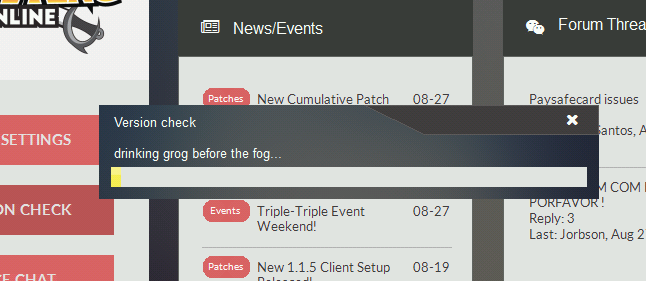
The very first thing you should do is try by doing a 'Version Check' this will ensure your launcher and client are the latest available offering, as older ones may not function properly or do not have capabilities to play.

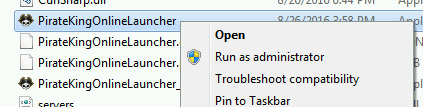
1. Locate PirateKingOnlineLauncher.exe and execute as Administrator. Right-Click on PirateKingOnlineLauncher.exe and click "Run as Administrator". PirateKingOnlineLauncher.exe is located in main client folder, or you may have a short cut to PirateKingOnlineLauncher.exe on desktop.

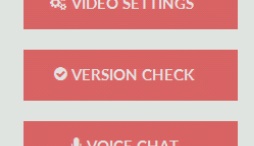
2. After the client launcher is launched, Begin Version Check by clicking on button at top left corner, Where a drop menu will appear with choice of "Version Check" in the top of list.

3. The launcher will automatically quickly scan your client files and begin to download any missing or malformed client files.


At this point, If you are still unable to play, It means that you have a service or program that is actively blocking the connection such as firewall or anti-virus.

1. Unfortunately because there is too many anti-virus and firewall solutions there is no easy way of turning them off, You will need to contact your antivirus/firewall company to ask them how to remove/stop.

2. In very rare condition, You may have a ISP that does internet filtering which means you most likely cannot play because ISP do not remove or allow you to circumvent this filtering.
 
I have not uninstalled my anti-viurs. It's just expired (meaning I can't use the firewall and realtime protection or other functions). It will affect the game though it is expired?
 
I have not uninstalled my anti-viurs. It's just expired (meaning I can't use the firewall and realtime protection or other functions). It will affect the game though it is expired?
Yes, must uninstall.
 
How about the built-in windows defender (acts as anti-virus)? I turned it off?

SOrry for the questions. How does expired antivirus blocks the download?
 
How about the built-in windows defender (acts as anti-virus)? I turned it off?

SOrry for the questions. How does expired antivirus blocks the download?
windows defender is anti-malware, not anti-virus, but yes, should turn off anti-malware and then uninstall all anti-virus.
 
Top