
Jaiplays
Squid Slayer
i just download the game and installed, but when i press start an error happen :c
plz help me :c

plz help me :c


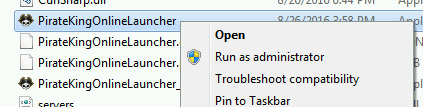

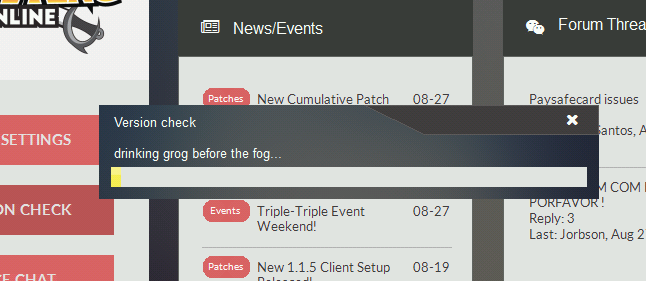
Your post indicates you are having intermediate problems with launching client. Our launcher is heavily customized, It is very diligent as it performs many critical functions that invokes proper playing condition.
The very first thing you should do is try by doing a 'Version Check' this will ensure your launcher and client are the latest available offering, as older ones may not function properly or do not have capabilities to play.
1. Locate PirateKingOnlineLauncher.exe and execute as Administrator. Right-Click on PirateKingOnlineLauncher.exe and click "Run as Administrator". PirateKingOnlineLauncher.exe is located in main client folder, or you may have a short cut to PirateKingOnlineLauncher.exe on desktop.
2. After the client launcher is launched, Begin Version Check by clicking on button at top left corner, Where a drop menu will appear with choice of "Version Check" in the top of list.
3. The launcher will automatically quickly scan your client files and begin to download any missing or malformed client files.
At this point, If you are still unable to play, It means that you have a service or program that is actively blocking the connection such as firewall or anti-virus.
1. Unfortunately because there is too many anti-virus and firewall solutions there is no easy way of turning them off, You will need to contact your antivirus/firewall company to ask them how to remove/stop.
2. In very rare condition, You may have a ISP that does internet filtering which means you most likely cannot play because ISP do not remove or allow you to circumvent this filtering.


Hi, as the dialog mentioned, please share us the log file so we can see the details of problem.
While I'm happy you've fixed it, but I would liked if you shared what was the problem, and how did you solve it, because this forum topic is public, many more people will search and come to this topic seeking for solution too.i already fix it, thankz you so much Zankza sempai :3
While I'm happy you've fixed it, but I would liked if you shared what was the problem, and how did you solve it, because this forum topic is public, many more people will search and come to this topic seeking for solution too.
Great. Thanks for sharing~!im just disable antivirus
Pirate King Online (also known as Tales of Pirates) is fully 3D designed multiplayer online game based on 5000 years of background history with Pirates as its central theme. It is comical in nature and has humorous looking characters and creatures. The games scenery is splashed with bright and beautiful colors everywhere. The exaggerated movements and actions of characters as well as objects, topped with an atmosphere that is very relaxed, makes the game consistently entertaining and always interesting and fresh for newbies and veteran players alike.
Platform:
Release Date: July, 2016
Game Type: Fantasy MMORPG
Features: Very customizable characters, PK focused, Guilds system, Advanced commerce, Vanilla, Regular events


